From URL to app,
in four stations.
appifymy.link does not wrap, proxy or copy your site. It presses a tiny launcher — an installable shell with your icon, name and destination baked in — and gets out of the way the moment you open it.
-
01
Feed
You paste a URL. We scan the page once for its title, icons and theme colour so the app looks right — you can override all of it.
-
02
Press
We press a PWA shell: a web manifest, your icons, and a ~1 KB launcher page with the destination baked straight in. No database lookup at launch.
-
03
Ship
The shell is hosted at
apps.appifymy.link/app/…on Cloudflare's edge. That address is your install link — share it or open it yourself. -
04
Install
Open the link in Chrome or Edge on your laptop or phone and install. Your browser keeps a snapshot of what you installed; every launch of the icon redirects instantly to the real site. We are never in the middle.
Notice board
The plain facts about what appifymy.link does — and does not — do.
-
Routing
Your traffic never passes through appifymy.link
The installed app opens, and your browser performs the redirect to the destination on its own. Nothing about the site you visit is proxied, rewritten or logged by us along the way.
-
Independence
Installed apps are frozen — and keep working without us
When you install, your browser keeps a snapshot of the launcher on your device, and every launch runs from that copy alone. Nobody can change what is installed after the fact — not the app's owner, not appifymy.link — and if this service disappeared tomorrow, every existing install would carry on redirecting exactly as before. To pick up a change, you simply install again from the link.
-
Install links
Install links do rely on the server
The link you share —
apps.appifymy.link/app/…— is served by us, and it must stay live for new installs. To keep the server healthy, links may be purged periodically after a year. Existing installs are unaffected; you would simply press a fresh link to install on another device. -
Privacy
No personal data, only a manage key
There are no accounts, no email addresses and no analytics on your visitors. The only thing tying you to your apps is a manage key kept in your browser. If you lose that key there is no recovery route — nobody, including us, can hand access back, so copy it somewhere safe.
-
Address bar
The URL bar at the top is a safeguard, not a bug
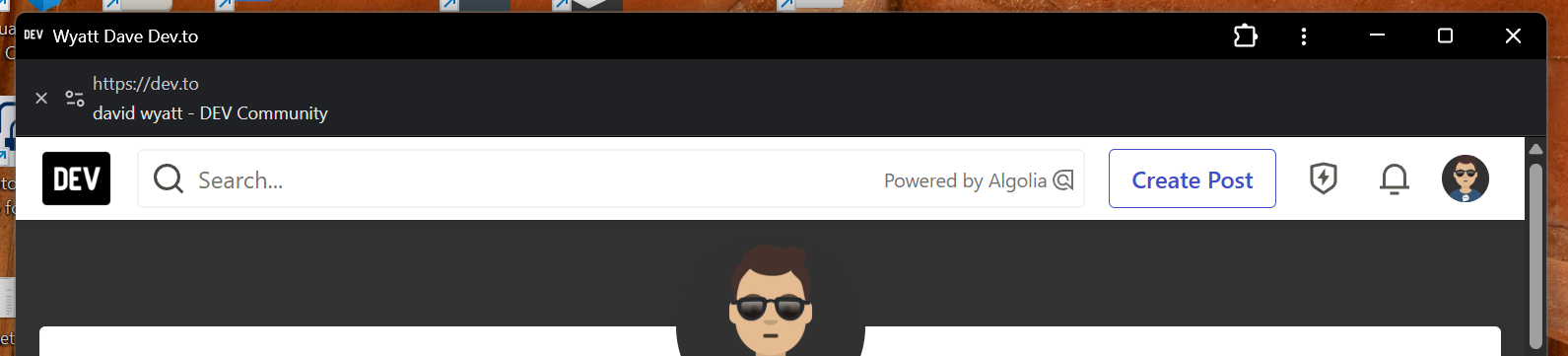
When an installed app leaves its own address, Chrome and Edge insist on showing a URL bar across the top of the window. It cannot be hidden, and that is the point: you can always see the real site you have landed on, so a launcher can never quietly send you to an impersonation. Before installing any app, check that the address bar shows the site you expect — and never install from a link you do not trust.
-
Liability
Report anything suspicious
Anyone can press a launcher for any public URL, and appifymy.link is not liable for the destinations people choose or for what happens after an install. If you come across a link that looks wrong, report it through Report abuse and include the install URL so we can take it down.